Sierpiński gaskets in Swift
I played the Chaos Game today to make a Sierpiński gasket (aka Sierpiński triangle). You can read the code below or download the Swift Playground to experiment with it yourself.
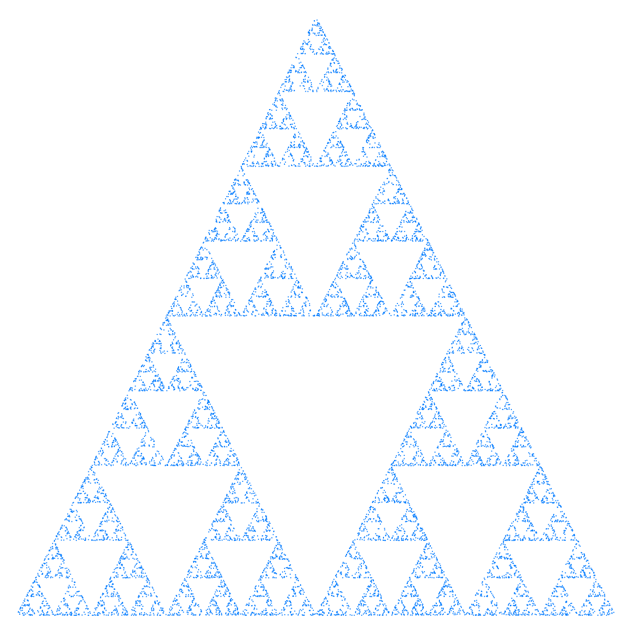
Just plot some points using this simple algorithm to see a ghostly fractal triangle appear from nothing:
- Set your “current” position to any of the three corners of the big triangle
- Plot a dot at your current position
- Pick any of the three corners
- Find the midpoint of your current position and that corner
- Set your current position to that midpoint
- Goto 2
I’ve been fascinated with fractals since my Dad took me to a lecture given by the legendary Benoit Mandelbrot at UNSW (or maybe it was USYD?) back when I was a kid in the late 80s. I remember writing BASIC programs for my Apple IIc and leaving them running overnight to make just one fuzzy postcard from some hidden nook of the Mandelbrot set.
But for maximal simplicity versus awe, you can’t beat Sierpiński gaskets. So easy!
The easiest way I know to plot points these days is on a SwiftUI Canvas. You’ll need to wait for all the points to plot before you can see the image so don’t make numDots too big.
Making the canvas redraw as it plots each point is left as an exercise to the reader. ;)
import SwiftUI
import PlaygroundSupport

let numDots = 1000
let dotWidth: CGFloat = 1
let dotColour: Color = .blue

let points: [CGPoint] = [
    .init(x: 0, y: 1),
    .init(x: 1, y: 1),
    .init(x: 0.5, y: 0)
]

let canvas = Canvas { context, size in
    // 1.
    var current = points.randomElement()!

    for _ in 0..<numDots {

        // 2.
        context.fill(dot(for: current, canvasSize: size), with: .color(dotColour))

        // 3.
        let selection = points.randomElement()!

        // 4.
        let midpoint = CGPoint(
            x: selection.x + (current.x - selection.x) / 2.0,
            y: selection.y + (current.y - selection.y) / 2.0
        )

        // 5.
        current = midpoint
    }
}
.frame(width: 200, height: 200)

func dot(for point: CGPoint, canvasSize: CGSize) -> Path {
    .init { path in
        path.addRect(
            .init(
                x: point.x * (canvasSize.width - dotWidth),
                y: point.y * (canvasSize.height - dotWidth),
                width: dotWidth,
                height: dotWidth
            )
        )
    }
}

PlaygroundPage.current.setLiveView(canvas)
